Choose how to play at deuce
On the Watch, choose Match under New game. At 40–40, choose advantage if a pair must win two points in a row, golden point if the next point wins, or star point if you want a deciding point the third time the game reaches deuce.
Set the match length and service order
Choose one set or best of three. You can play a tie-break to seven at 6–6 and, in a best-of-three match, a deciding super tie-break to ten. Both require a two-point lead. Select who serves first, which opponent serves next and who receives on the right for each pair. Tap Start. To set up the match on iPhone instead, open Matches, tap +, enter the players’ names and choose Start on the Watch.
Tap the winner of each rally
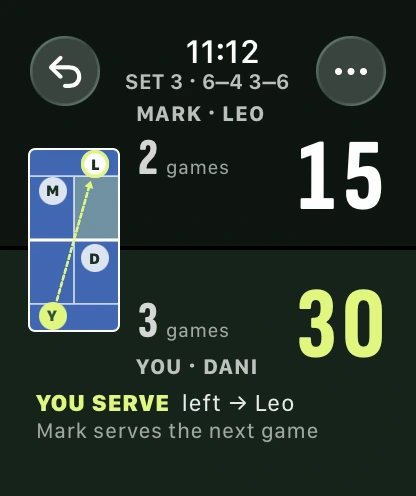
Tap the bottom half for your pair and the top half for your opponents. Say you lead 30–15 and lose the rally. Tap the top half once to make it 30–30. If you tapped your own pair and see 40–15, tap the curved arrow at the top left to undo the last point, then tap the top half.
Check who serves next
Look at the mini court before you serve. It shows the server and which side to serve from. On a deciding golden or star point, the receiving pair chooses who returns.
Save the result when you leave the court
After match point, review the summary and tap Done. If your court booking ends mid-set, open the ⋯ menu and tap End game to keep the score as it stands. The result appears in Matches on your paired iPhone when the devices reconnect.